
Background knowledge, Features, Software Release
Navigating the Invisible: Mastering the “Jump Planner” in airlog.app
May
As skydivers, we spend a lot of time looking at the ground, but it’s the invisible ocean of air above it that dictates where we land. Understanding your reach isn’t just about knowing your canopy; it’s about knowing how the air moves at every altitude.
Today, we’re looking at the tech behind the Jump Planner—the latest high-precision safety and mission-planning feature in airlog.app.
The Problem: Wind isn’t a Constant
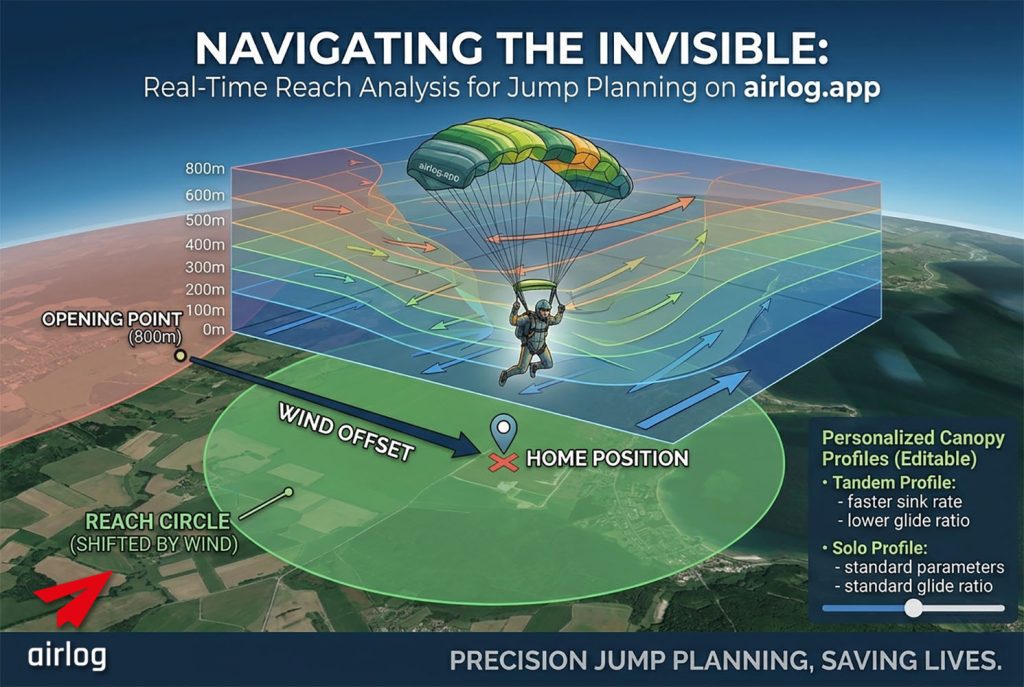
Most jumpers estimate their reach based on a simple mental radius. But wind doesn’t just slow you down; it physically shifts your entire field of possibility. Whether you are flying a high-performance solo wing or a large tandem canopy, the layered winds between your opening altitude and the ground are constantly pushing your “canopy bubble” away from your intent.
The Tech: Layered Vector Integration
The Jump Planner doesn’t just look at surface winds. We utilize Open-Meteo layered wind data, interpolated into 100-meter increments from the ground up to 4,800m.
When you use the planner, the system performs a Cumulative Vector Summation:
-
The Drift: We calculate the exact offset the wind creates in every 100m layer.
-
Personalized Parameters: You can edit and personalize flight parameters for both Solo and Tandem canopies, adjusting for specific sink rates and forward speeds (Airspeed).
-
The Result: Instead of a simple circle around your opening point, we render a Shifted Reach Circle.
Physics 101: Why a Circle?
It sounds counter-intuitive, but your reach on the map remains a perfect circle—it just isn’t centered on where you pulled.
Think of it this way: You are flying inside a “block of air” that is moving. Within that block, you can fly 1,600 meters in any direction. However, the entire block is drifting 800 meters East while you descend. On the map, your reach is a 1,600m circle centered on a point 800m East of your opening position.
If the Dropzone isn’t inside that shifted circle, you aren’t making it home.
Planning the Mission: From Exit to Landing
The Jump Planner goes beyond just “where you are now.” It allows you to simulate the entire jump from the moment you leave the plane:
-
Exit Point Control: The planner starts by suggesting the Best Exit Point based on current winds, but you can manually set a Real Planned Exit Point to see how your specific flight path will look.
-
Map View: See your horizontal reach at a glance. If the Home Position (DZ) is outside the circle, you’re looking at an “out” landing.
-
Side View: Switch to the side profile to visualize your glide path. This is crucial for understanding how much altitude you’ll have left when you arrive back at the DZ.
-
Opening Height Slider: Instantly see how a higher opening or a lower pull affects your reach. This is a game-changer for Tandem masters who need to account for varying student weights and opening altitudes.
Safety Through Personalization
A heavy tandem wing and a nimble solo canopy have vastly different flight profiles. By personalizing these parameters in the Jump Planner, you aren’t just getting a generic estimate—you’re getting a calculation based on your gear and yourflight style.
Summary
Precision planning prevents “outs.” By combining high-resolution weather data with aerodynamic modeling, airlog.app gives you a look into the future of your canopy flight. Whether you’re aiming for the peas or ensuring a student’s safety, the Jump Planner is your most valuable tool on the ground.
Try the Jump Planner in your airlog.app dashboard today!
JumpPlanner is available on the dashboard start page of airlog.app, together with the current weather report for the location and the layered wind direction visualiser that shown speed and direction in different altitudes. Available to everyone, you don’t need a login!