
Background knowledge, Features, Uncategorized
Share Your Skydive: Public Track Links in airlog.app
Sep
Every jump you log with airlog already lives in your private logbook – your flight path, your altitudes, your speeds, your signatures. But skydiving is a social sport, and some jumps deserve to be seen by more than just you.
With V5.0.1 , airlog introduces per-jump track sharing – a simple way to generate a public link for any individual jump and share it anywhere, no login required.
This is the first building block of a larger idea: a coming TeamView that
overlays multiple jump tracks on a single map. Public links are how we make a
single track safely viewable from the outside world today, and how we’ll stitch
several together tomorrow.
From private logbook to per-jump access rights
Until now, every track in airlog was strictly private-visible only to the
logged-in owner. That’s the right default, and it doesn’t change. What’s new is
a per-jump visibility selector on the logbook detail page. Each jump can be
set to one of three states:
- Private** (default) – only you can see it
- Team – coming soon; will be used by TeamView to overlay team jumps
- Public – generates a shareable link anyone can open in a browser
The selector sits right next to the jump number on the detail page and is always
interactive, independent of edit mode or signature locking.
Toggling a jump to
Public instantly creates a short 5-character ViewID and a reverse-lookup
index in the airlog cloud; toggling it back to Private instantly revokes the
link. There is no separate “sharing dashboard” to manage – the access right
travels with the jump.
A link that works anywhere
Once a jump is set to Public, the detail page shows the share link:
https://airlog.app/#/view/XXXXX
`XXXXX` is a short, unambiguous 5-character ID (no `0`/`O`/`1`/`I`/`l` to
confuse anyone). Open it in any browser-desktop or mobile-and the public
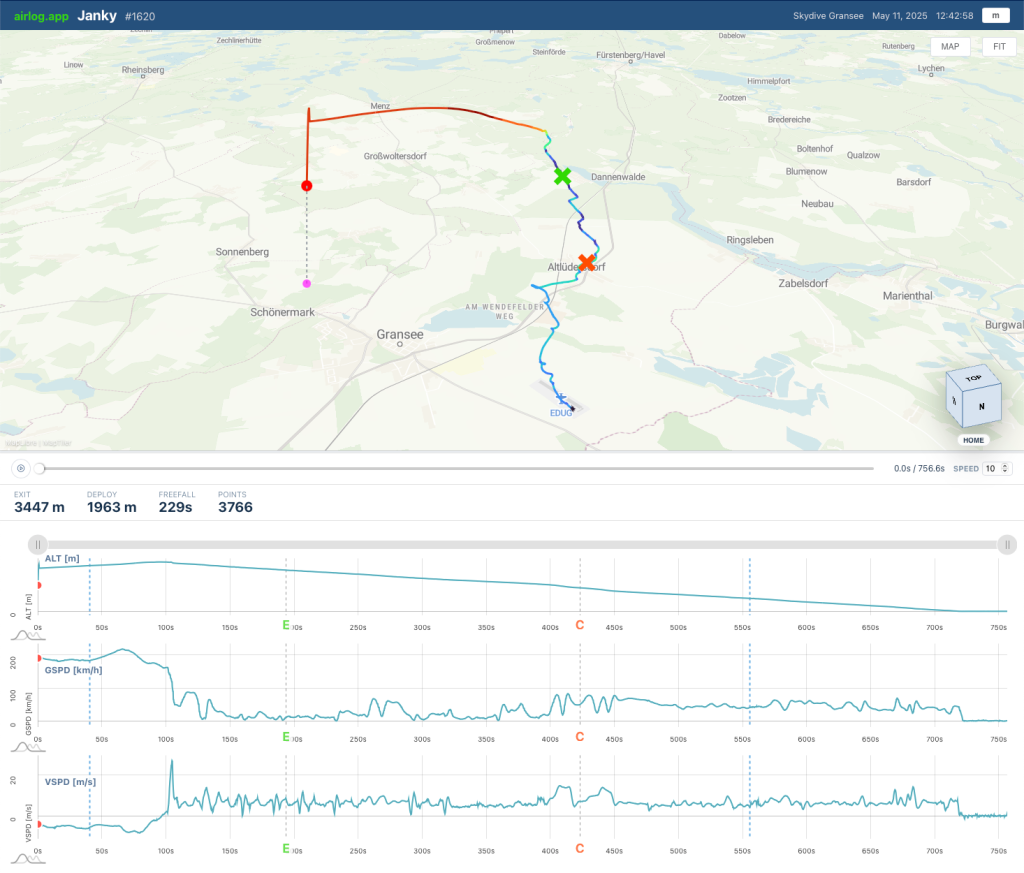
track viewer loads with:
- a large 3D map of the flight path (altitude-lifted over a tilted
base map, streets or satellite) - a speed-colored track – red/orange for freefall, blue for canopy
– three synchronized **graphs** underneath: altitude, ground speed, sink rate - a replay scrubber with play/pause and speed control
– exit (E) and deploy (C) markers on both map and graphs - a position dot, plumb line, and ground shadow that move as you scrub
- an m/ft unit toggle
- a draggable divider between map and graphs
The layout is full-width and minimal – no app chrome, no login wall, no navigation. It’s designed to be the single thing on the screen: the jump.
You can drag the divider between map and graphs to give more room to whichever side you’re focused on. The map resizes live as you drag.
Reduced personal data – your callsign, not your name
A public link is meant to be shared externally, so the viewer intentionally shows very little about you. The header displays **your callsign** only – not your full name, not your email, not your account info. You control what your callsign is in your profile, so you decide what the world sees when your jump
goes public.
If you haven’t set a callsign, the viewer falls back to your username – so set a callsign in your profile if you want a clean, recognizable handle on shared jumps.
## Revocable at any time
Sharing is never permanent. Set the jump back to **Private** and the public link stops working immediately – the ViewID is removed from the cloud index and the viewer returns nothing. You can flip a jump public for a day to share with a friend, then lock it back down. No links to chase down, no “unshare” buttons to hunt for – the access right lives with the jump.
Built for tandem masters
This feature was designed with **tandem masters** in mind. After a jump, you want to give your guest something tangible – the track of *their* skydive. With airlog, the workflow is:
- Log the jump as usual (it’s Private by default).
- Set the jump to **Public** on the detail page.
- A share link + **Copy** button appear. Next to it, a **QR** button.
- Tap **QR** – a dialog pops up with a QR code of the link, the URL, and a Copy button.
- Have your guest scan the QR code with their phone camera, or copy the link into a message. They open it in any browser – no app install, no account.
The guest sees a clean 3D visualization of the jump they just did: the freefall, the canopy deployment, the glide home – all scrubbable and replayable. You stay in control of your identity (callsign only), and you can revoke the link the moment you want to.
What’s next: TeamView
Public links are the first half of the story. The same per-jump visibility selector feeds the upcoming **TeamView**: set several jumps to **Team**, and they’ll overlay on a single map screen for debriefing relative flight paths.
The public viewer you see today is effectively the prototype for that view – same map, same graphs, same 3D track – extended to multiple jumpers.
For now: set a jump to Public, grab the link or the QR code, and share the skydive.